
Maxshot Scooter Charger: Replacement & Buying Guide (2026)
A replacement Maxshot charger must match your original's exact output voltage and barrel connector - check the label on your current charger or your model's manual before buying, since specs can differ between the V1, V7 and S5.
Quick answer: a replacement Maxshot scooter charger must match your original charger's output voltage and barrel connector exactly — the safest move is to read the specs printed on your existing charger's label (output volts and amps) and match them. Maxshot models use a standard barrel-plug charger, but capacity can differ between the V1, V7 and S5, so always confirm against your own model before buying. Using a mismatched charger can damage the battery or create a fire risk.
Here's how to identify the right charger and spot a failing one.
How to find the correct charger specs
Every charger has a printed label — that label is the source of truth, not guesswork. Look for:
- Output voltage (V) — e.g. printed as "Output: XX V". The replacement must match this.
- Output current (A) — the amperage. Match it, or use one rated the same; a much lower amp charger will charge very slowly.
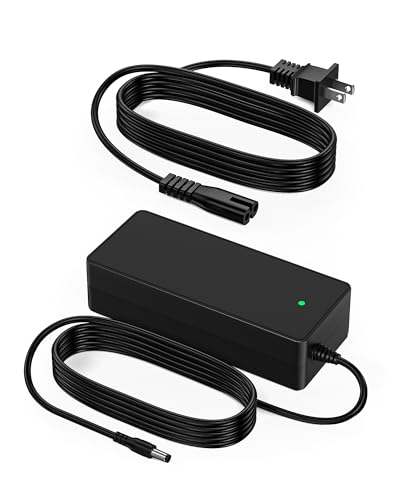
- Connector type — Maxshot scooters use a round barrel (DC) plug. Note the plug's size and shape.
If your original charger is lost, check the specs in your Maxshot manual or on the current product listing for your exact model. Don't assume all Maxshot chargers are identical — confirm your model first. See our specs page to identify which model you own.
Matching a charger to your Maxshot model
Maxshot's lineup includes several models, and battery/charger details can vary:
- Maxshot V1 — the main model.
- Maxshot V7.
- Maxshot S5.
Before buying a replacement, confirm the voltage and connector for your scooter using its own charger label or manual. When a listing says "for Maxshot," still verify the output voltage and plug match your unit — a compatible listing is only compatible if those numbers line up.
Signs your Maxshot charger has gone bad
Chargers fail more often than batteries. Watch for these symptoms:
- No light when plugged into a working outlet and the scooter.
- Light stays green and the battery never actually charges (the charger isn't delivering current).
- Cuts in and out — the light flickers or charging stops if you nudge the cable, usually a frayed wire or a loose barrel tip.
- Gets excessively hot, buzzes loudly, or smells of burning — stop using it immediately and unplug.
- Damaged cable or bent plug — visible physical damage.
To confirm it's the charger and not the scooter, see whether the issue follows the charger. Our charging guide walks through isolating the cause.
Maxshot charger quick-reference: symptom, cause and fix
Match what the charger is doing to the most likely cause before you buy a replacement:
| What you see | Likely cause | What to do |
|---|---|---|
| No light on a working outlet | Dead charger or a bad outlet/cable | Test a different outlet first, then replace the charger if the light still won't come on |
| Light stays green, battery never rises | Charger isn't delivering current even though it's lit | Replace the charger — see the charging guide to confirm the port and routine aren't the real cause first |
| Charging cuts in and out when the cable moves | Frayed wire or a loose barrel tip | Inspect the cable and plug for damage; replace rather than tape a frayed cord |
| Charger gets very hot, buzzes or smells of burning | Internal fault — fire risk | Stop using it immediately, unplug, and replace before charging again |
| Charges normally but range or runtime has dropped | Not a charger problem — usually the battery itself | See battery replacement instead of swapping the charger |
| Display shows an error code during or after charging | Fault unrelated to the charger (controller, motor or battery communication) | Check the error codes guide before assuming the charger is at fault |
Charger vs battery: which one is the problem?
A scooter that won't charge could be the charger or the battery. Quick way to tell them apart:
- If the charger shows no light or wrong light behavior on a known-good outlet, suspect the charger.
- If the charger lights normally and reads as "charging" but the battery level never rises, or the scooter shows an error code, suspect the battery or BMS — see our battery replacement guide.
- If the display shows an error, check the error codes guide — a battery fault can block charging entirely.
Replacing a charger is far cheaper than a battery, so rule the charger out first.
Safety when buying and using a replacement
- Only buy a charger that matches your original's output voltage and connector — this is the single most important rule.
- Prefer chargers described as compatible with Maxshot scooters, but still verify the printed output specs before you plug in.
- Never substitute a laptop, phone, or unbranded power supply with different voltage.
- Inspect a new charger for a proper label and safety markings; a charger with no printed output rating is a red flag.
- Charge indoors at room temperature on a non-flammable surface, and unplug when the light turns green.
For anything beyond charging, start at the troubleshooting hub or browse parts & replacement.
Popular options on Amazon
Prices change often - check the current price on Amazon.



Frequently Asked Questions
What charger does a Maxshot scooter use?
Can I use a higher-voltage charger to charge faster?
How do I know if my Maxshot charger is broken?
Where can I buy a replacement Maxshot scooter charger?
My Maxshot charger light stays green but the scooter never charges — is that the charger?
Ready to check the latest price?
Shop compatible Maxshot scooter chargers on Amazon — match your model's voltage and connector before you buy.